Sunday, November 22, 2009

Old and New


New Me!


Sometime last spring, I began to notice an occasional hitch--or catch--followed by a sharp snapping sound coming from the drive train (chain, crank, or bottom bracket) of my light-weight road bike. When I put the bike on the repair stand, I could create the same effect. There was indeed something that almost locked up the drive train. If I pushed hard enough, I would hear a pop and then it would seem fixed; smooth pedalling would continue for some considerable period of time.

I couldn't determine the exact location of the sound, so I decided to just keep riding the bike. Eventually it would fix itself or something would break, and then I would deal with it. And so I churned on for several thousand miles of summer suffering, including the Big Dam Bridge 100-mile ride. I was still recording reasonably fast rides--though I had not managed anything memorable for months. Just old age, I thought to myself--nonetheless a little irked.

After we returned to the Ozarks from Bethany Beach, I found myself drained after some rather slow rides. Well, there had been the sodden weeks of rain in October, followed by lethargy during the drive out East and back. Perhaps I was just out of shape--so I rode a little more and a little harder until one day I could hardly even turn the cranks and there was a perceptible grinding noise like sandpaper rubbing across a windowpane. Finally, I knew the cause of my problems, and it wasn't just (or even primarily) that I am getting old and slow. My bike's axle-bearings were shot.

Several days ensued during which I labored to discover what kind of bottom bracket my road bike uses and what exotic tools I might need to replace it. Lurking beneath the surface was the dim worry that perhaps I couldn't replace the part at all. After all, the bike had been used for five seasons, seeing about 20,000 miles of hard use. Would I be able to get enough leverage to unscrew the part without breaking something (most likely my knuckles) or stripping the threads? Could I even remove the cranks to get at the bottom bracket?

Time and patience prevailed. From studying pictures on the web, I deduced which tools I'd need and determined exactly which bottom bracket to order as a replacement. Bike technology, like most other technology, has rapidly become complicated by diversity. This is especially true of light-weight racing bikes. The desire of weight-weenies to cut grams has led to continuous redesign of bike parts that once seemed simple and unchanging. In the old days, when I first began wrenching on my own bike, the cranks and axle were a single piece of bent, stout steel laced through the bottom bracket. The bearings were the size of large bb's and were packed into races machined into the rims of the bottom brackets. Cups slopped full of grease and threaded onto the axle held it all together. Every year or so I would have to add more grease, but the rest of the mechanism seemed immortal.

About ten years ago I had my first encounter with sealed bearings, which never need greasing--and cannot be greased. Nice! But the cranks and axle on a super-light racing bike are marvels of modern technology. The cranks are carbon fiber, making them stiff and very light. The axle has to be the stiffest part of the entire bike because of the torques to which it is subjected. That is why it was made of such heavy steel in the past. A light-weight racing machine, however, uses an axle that is much bigger in diameter (to provide stiffness) and hollow (to save weight). This very clever way of building an axle means, however, that there is less room for the wheel bearings. They are miniature bb's now; and they wear out faster than they once did, requiring that the entire part must be replaced. Thus, the classic bicycle bottom bracket was heavy and hearty, while the high-tech replacement is much more frisky and finicky. It's fast and light, but not particularly fragile. On the whole a considerable improvement. Time passes; things improve.

As it happens, I have just had another--and entirely opposite--experience contrasting old and new technology. When I was a boy and young man, eyeglasses were really made of glass. Glass is the perfect material for optics. It is hard and scratch-resistant with excellent refractive properties. That is why telescopes generally still use glass optics.

There are only three problems with glass lenses: (1) glass is quite brittle, making it easily shattered in some circumstances; (2) glass is relatively heavy; and (3) glass is quite hard, making it difficult to grind and polish. The design problem presented by these three qualities is not difficult to solve. Because glass is brittle, eyeglass lenses ought not to be too thin. But making eyeglass lenses thicker makes them heavier, so to keep the total weight down, the lenses should be kept small. Smaller lenses are somewhat easier and less expensive to grind. For centuries, then, corrective lenses have tended to be tiny--like the 19th-century pince-nez or John Lennon's granny-glasses.

Sometime after 1970, however, plastic lenses came into vogue. Plastic is much easier to grind and is about half the weight of glass. For ordinary prescriptions (not bifocals), the lenses could be ground on the premises of the optometrist, and the lighter weight gave frame designers many more options--leading sometimes to very large lenses in unusual shapes--think Elton John. Plastic is also more shatter-resistant and more UV-resistant than glass. For these reasons nearly all modern eyeglass lenses are now plastic. Unfortunately, plastic has two rather serious flaws. First its refractive properties are inferior to those of glass, so you just can't see as well with plastic lenses--especially if you have a strong correction. Second, plastic is easily scratched, and even the scratch coatings on plastic are inadequate. To the optometrists, these aren't really problems; they'd like you to get a new set of lenses every year anyway. To the purchaser, however, it is simply irritating to pay hundreds of dollars for a pair of glasses that start to deteriorate almost immediately.

This year, when I went in for new glasses, I decided to insist on glass. It was a bit of a battle, as I was forced to listen to multiple lectures from everyone in the office on the superiority of plastic. They like to blather on about the horrendous weight of glass, but their favorite tactic is to raise worries about getting shards of shattered glass in one's eyeballs--forgetting entirely that plastic shatters too and that eye injuries caused by broken spectacles are very rare. I listened politely, but I got my way. Eventually, I was allowed to pick out a small pair of frames to cradle my glass lenses. Then my frame and prescription was shipped off to an out-of-town facility that could actually grind glass.

I couldn't be happier with the result. As the photos below indicate, the new frames and lenses weigh exactly the same amount as my prior set of plastic lenses in larger frames. The optics are superb. Best of all, these lenses should last years without deteriorating in any way.

So, modern high-technology in bicycles and in bifocals is lighter, but far less durable than the older way of doing things. There may be a general principle at work here. The heavy typewriter I used while writing my dissertation is still perfectly functional, but I have half-a-dozen worthless old computers gathering dust in the closet. In some cases (eyeglasses) the old ways are better, while in others the light-weight, high-tech stuff is superb. Nothing could get me to haul out my fifteen-pound 1960-vintage portable typewriter to compose a blog when I have the option of writing on a three-pound netbook. Indeed, that old Remington weighs nearly as much as my shiny, new Motobecane SL racing bike!

One final observation: businesses love profit, and hardly anyone will promote the free solution to a problem. I've lived with severe myopia all my life, but only when I was researching this blog entry did I finally discover that in a pinch one can fashion a pair of corrective spectacles for daylight use by poking two pinholes, pupil-width apart, in a strip of flimsy cardboard! But who could sell such an item at a profit so why publicize the possibility--even though it's exactly the sort of tip that could save some camper's life after a tumble down a wilderness hillside.
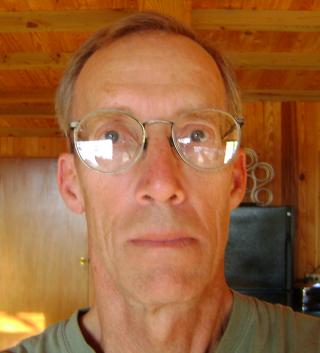
Old Me

Saturday, October 31, 2009

Installing Tiny Core Linux on My Eee 900

 
A strong argument can be made that Tiny Core  Linux is the fastest-booting and most efficient operating system currently available--especially for netbook computers that are used for web browsing and cloud computing. Tiny Core is a modular operating system, allowing each user to select the programs and features most suitable for his system. I wanted to make my system as compact as possible so that it would boot quickly while still having a full-featured browser and other fairly standard capabilities. The total operating system described in these paragraphs uses only 44.1 megabytes of file space. While this installation is optimized for my Eee 900, the basic concept should be applicable with minor variations on a wide variety of other netbooks and laptops.
   
Assumptions:
You have access to a working version of linux.
You have about 100 MB of free space on sda1 (or your computer's boot partition).
   
Steps:
1. Create two directories on sda1 for your Tiny Core installation. Name one of them "tiny" and name the other "tce." Within the "tce" directory create another directory named "optional". 

2. Download the Tiny Core iso from http://distro.ibiblio.org/pub/linux/distributions/tinycorelinux/2.x/release/
   
3. Use an archive manager (FileManager in Xandros) to extract "bzImage" and and "tinycore.gz" from the Tiny Core iso. Put both of them in your "tiny" directory on sda1.
   
4. Use a file editor with root privileges to find and open your GRUB "menu.lst". You should be able to locate it in /boot/grub on sda1. Check that the GRUB menu is set to display during boot-up by commenting-out the "hiddenmenu" entry. (I.e., put a # at the beginning of that line.) Next give yourself some time to select your choice of operating system during the boot process; initially, I recommend that you set "timeout=5", but you can later reduce that to 1 or even 0 to speed boot time. Then, scroll to the end of the file and type in the following text:

  title Tiny Core Linux
  root (0x80,0)
  kernel /tiny/bzImage quiet tce=sda1 home=sdb1 opt=sdb1 nodhcp
  initrd /tiny/tinycore.gz


(NOTE: "root (0x80,0)" is the sda1 partition on my Eee 900 and it is used in each of the other three grub entries for the standard Xandros installation. If the boot partition is described in some other way on your machine, then use that designation. For example, on some hard drives it is "root (hd0,0)". Use whatever is the standard for your other grub items.)

At this point, save the changes you have made to menu.lst and reboot your computer. If all has gone well, you should be able to reboot into Tiny Core Linux. To add software and continue building your operating system, you will need to have a wired (ethernet) connection to the internet. Usually, this is as simple as plugging the appropriate wire either into the ethernet ports on your Eee and your router, or into the usb ports on both machines.

Now you are ready to build a fully functional system. I am going to recommend the smallest setup that provides wifi access, a browser, a couple of text editors, a couple of file managers, a music player, a video player, and a flashplayer. Tiny Core Linux uses two different types of packaged programs: tce and tcz. While both types still work, tcz's are preferred for version 2.4 of Tiny Core. 

So, begin by using Apps (the gears button at the bottom-center of your display) to mount 915resolution.tcz (for better screen display on some Eee pc's with Intel chipsets), opera.tcz (a browser), mc.tcz (a file manager and file editor), wireeless-tools.tczl (wireless), wireless-2.6.29.1-tinycore.tczm (wireless), wpa-supplicant.tcz (wireless), OSS.tczm (sound), cpufreq.tczl (cpu speed control), beaver.tczl (a graphical editor), conky.tcz (systems reporting), and xmms-musepack-1.2.1.tcz (for music). This will download the relevant files to the tce directory on your sda1 partition.

Now, click on Aterm (the screen button at the bottom-center of your display) and type in "sudo mc" without the parentheses. This will open Midnight Commander your file-manager/file-editor. Find your way to the /opt directory and highlight the bootlocal.sh file. This is a file that automatically executes commands every time you reboot your computer. We will use it to connect to wifi and to set the cpu speed. Push the F4 key to open the file for editing. Enter the following lines:

  sudo iwconfig wlan0 essid any
  sudo udhpc -i wlan0
  sudo modprobe p4-clockmod
  sudo cpufreq-set -g ondemand
  sudo mount -t auto /dev/sdb1 /mnt/sdb1


Push F2 to save the changes you have made to bootlocal.sh. The first two commands assume that you are going to be using a public wifi signal (i.e., no password needed). If you will normally be using a password-protected network, you can modify the lines appropriately. For example, to connect automatically to a wep-wifi, you will need the following:

  sudo iwconfig ath0 essid your-essid-name
  sudo iwconfig ath0 mode managed key your-password
  sudo udhdpc -i ath0


Similarly, cpufreq-set can be changed to "conservative" for the improved battery life or to "performance" for the best performance. This can also be changed anytime you wish while using your computer by opening a terminal and typing in "sudo cpufreq-set -g ondemand" . . . or "sudo cpufreq-set -g performance." (NOTE: When you are in the terminal window, you can push the up-arrow to cycle through the commands you have recently used, sparing you the need to retype many commands.) Having made these changes to bootlocal.sh, shut down your computer. Note that the first time you shut down Tiny Core, you will be prompted to select a location for a backup file. You can select any location--sdb1, for example. 

Reboot your computer. If all has gone well, it will automatically connect to wifi. (If it doesn't immediately connect, open a terminal and type in "sudo iwlist scanning." It should show either ath0 or wlan0 with an ESSID name and other info. Based on what you find, edit your bootlocal.sh and try again.) Try out your Opera browser, your graphical editor (Beaver), and your mp3 player (Xmms). Now we are going to reboot the computer one more time before installing your flashplayer, your pdf reader, and another file manager. While we are at it, we will also set up conky to monitor your computer's performance.

By now you should be getting used to how quickly Tiny Core Linux boots up. (On my Eee 900 it takes less than 30 seconds to boot and acquire a wifi signal.) Once again, use Apps to mount the following files: getFlash10.tgz, emelfm.tgz (a graphical file manager), Mplayer-nodeps.tcz (a video player), and xpdf-3.02p12.tcz. These are some hefty applications and they may take a bit of time to download and mount. Once they have done so, you should open a new desktop (hit Ctrl-F2) and put your mouse somewhere on the screen. Then click the right mouse button, scroll down to Applications, and run getFlash10. After it does its thing, switch back to your first desktop (Ctrl-F1) and shut down your computer. Boot again, go to youtube.com, and test your ability to play flash video.
The three somewhat bulky programs you installed in the previous paragraph may have somewhat slowed your computer's boot time and/or eaten up too much ram. You can cure this by moving these programs and their dependencies into the /tce/optional directory. After you have done that, they will no longer load into ram when you reboot your computer, but you can invoke them at will by using Apps>File and mounting them from their directory.

Now there is a little more tweaking to be done. First, let's set up Opera so that it invokes xmms to play streaming audio. Start Opera and go to Tools>Preferences>Advanced>Downloads. Click Add and insert in the Mime box "audio/x-scpls" -- and insert in the Open box "xmms %s" (without the quotes). Use Opera to go to www.publicradiofan.com and see if you can play streaming audio through xmms. While we are configuring Opera, let's reduce its demands on flash drives. Go to Tools>Preferences>Advanced>History and change Memory Cache to 40 megabytes, switch Disk Cache to off, and tick the box for Empty on Exit.

Next we need a good default configuration for conky. Create a new file with Beaver and paste in the following text:

  # maintain spacing between certain elements
  use_spacer yes
  # set to yes if you want tormo to be forked in the background
  background no
  # X font when Xft is disabled, you can pick one with program xfontsel
  #font 5x7
  #font 6x10
  #font 7x13
  #font 8x13
  font 9x15
  #font *mintsmild.se*
  #font -*-*-*-*-*-*-34-*-*-*-*-*-*-*
  # Xft font when Xft is enabled
  xftfont Verdana:size=12:bold
  # Text alpha when using Xft
  xftalpha 0.8
  # Xft font when Xft is enabled
  use_xft no
  # Draw shades?
  draw_shades yes
  # Draw outlines?
  draw_outline no # amplifies text
  # Draw borders around text
  draw_borders no
  # Text alignment, other possible values are commented
  alignment top_left
  #alignment top_right
  #alignment bottom_left
  #alignment bottom_right
  TEXT
  ${color #FF0000}$nodename - $sysname $kernel
  ${color #0000FF}Uptime: $uptime
  RAM: $memperc% ${membar 8}
  Swap:$swapperc% ${swapbar 8}
  CPU: $cpu% ${cpubar 8}
  CPU Temp: ${acpitemp}C
  CPU Speed: ${freq}MHz
  ${color #FFFF00}/ ${fs_used /}/${fs_size /}${alignr}${fs_used_perc /}%
  ${fs_bar 8 /}
  /home ${fs_used /home}/${fs_size /home}${alignr}${fs_used_perc /home}%
  ${fs_bar 8 /home}
  ${color2}Battery ${color1}${battery}
  ${battery_bar}


Save this file as ".conkyrc" (without the quotes, but using the period at the front of the filename). Open a terminal window and type in "conky" (without the quotes). Close the terminal window. Now you can monitor cpu temperature and speed, as well as other features of the operating system. Many different configurations of conky are possible if you do a bit of reading on the internet.

Finally, I recommend two optional modifications. First, each time you shut down your computer, Tiny Core makes a backup file. But we have installed it in a way that creates persistent directories so that it is unnecessary and undesirable to load the backup file each time you reboot your computer. I recommend that you copy your current "mybackup.tz" to a removable usb stick and change the installation so that backups are not automatically made and loaded with each boot. To do so, open a terminal window, type in "sudo mc", scroll down to ".profile" and highlight it. Push F4 to edit the file. Scroll down to the line that starts "export BACKUP" and edit it to "exportBACKUP=0." Push F2 to save your changes. Bingo. Tiny Core will no longer automatically backup and reload your system, but can still be made to do so if you desire it. Second, you'll probably want to use Opera every time you boot your computer. To make it start automatically, you need to edit your ".xsession" file (using "sudo mc" as above). Simply add "exec opera" at the end of the file, save it, and reboot.

This is the way I have set up my Eee 900 for optimal use for most daily tasks. Enjoy modifying your own installation. If you make a mistake, it is easy to reinstall everything in this small, efficient Linux version.

Thursday, October 1, 2009

For the past several years, I have made an annual resolution to swim across our part of the lake at least once before autumn. This year autumn seems to be setting in early and the lake is already a little chilly. Yesterday I decided it was now or never for the 9/10ths of a mile ordeal.

Sue served as photographer and oarsman, working perhaps harder than I did since she had to row back across the lake with me in boat. Her pictures say it all. Click on them to see larger versions.

Setting off


Nearing shore


Finally done

Wednesday, September 30, 2009

Biking the Big Dam Bridge 100


Last Saturday, in celebration of my 61st birthday, Sue and I drove to Little Rock to ride the Big Dam Bridge 100.

This charity ride is only four years old, but it has already become the largest cycling event in Arkansas, drawing some 2,000 participants. Sue and I both achieved personal records. On her part, she rode 30 miles at an average speed of 16.5 mph. I took on the 100-mile marathon, cruising along at 18.8 mph.

It was a pleasant trip--nice soft beds in the motel, plenty of friendly fellow cyclists, oodles of lovely bikes to admire!

If you want to get a feel for this event, have a look at the following youtube videos. The first video shows some leisurely riders cruising to a catchy tune. The second gives a better idea of what it is like riding in a pace line.

http://www.youtube.com/watch?v=BGF5FVr1QRY

http://www.youtube.com/watch?v=SIfZabkEqX4

Tuesday, September 29, 2009

Dave and Lisa Kayak the North Fork River


In the third weekend of September, David and Lisa came for a brief visit. Basically, they had three days of fairly steady rain, but they were able to squeeze in a kayak trip down the North Fork River. Below the dam the North Fork is very cold and has become a nationally famous trout-fishing stream, so a float down it always includes a chance to see plenty of decked-out fishermen--often in the process of reeling in a big one. Usually one can also see many fish, a few happy herons, and the occasional bald eagle. This fall there were also plenty of wildflowers in bloom--though their names escape me at the moment. The accompanying snapshot shows David and Lisa as they were about to set out on their float.

While they floated the river, Sue and I biked in the area. We both warmed up on River Road, which runs for four miles along the bank of the White River. It's a very pretty ride--both because of the river with its dramatic bluffs and because a couple of the home-owners are enthusiastic and successful gardeners whose yards are always luxuriant and colorful. Sue stayed below in the flatlands while I completed my ride by climbing Matney Mountain. Matney is one of the best climbs in northern Arkansas--two miles uphill culminating on a ridge that provides lovely expansive views of the Ozark National Forest spread out below. The downhill cruise is fast and fun taking me to the 40 mph range that I try to maintain as my upper limit. Any faster and I start to get very scared.

Because of the plentiful rain, the four of us entertained ourselves playing ping pong on the table that I built from plywood siding salvaged from residing sections of our home in Jonesboro. Note the steady red-eye focus as David gets the ping-pong ball perfectly centered on his paddle.