Monday, October 29, 2012

Cabin Building Continues

Trips to New Orleans and Tampa have somewhat slowed the pace of construction, but things are moving ahead steadily. One-inch foam panels were cut to fit between the floor joists and are supported by furring strips. This insulation should make the floor cozy in the winter months.


The subfloor is 3/4" tongue-in-groove Advantech 4x8 plywood. This product is supposed to be able to shed water for 90 days or so--giving builders time to get the roof up before moisture damage can occur. The pictures show Terry and me standing about idly while Jim is down on his knees trying to figure out a problem in making the last few pieces of plywood fit. (Really and truly, Terry and I are not always so idle!)


 The next two snapshots show the current state of the project. Look closely and you can see the temporary cleats (or blocks) near the top of the posts. Today's work will have us lifting 2x12 beams to rest on those blocks. We will glue, nail, and bolt them to the posts.
 Note the various cross braces in the snapshot below. No matter how hard one tries, it is impossible to get the posts perfectly vertical as they are lifted and cemented into the foundation holes. The bracing brings them into better position and will stay in place until the 4x4 cross beams firm up the entire frame.

One of my biggest nightmares in the planning of this addition has been calculating the exact height at which the beams should attach to each post. The new roof must wedge under the roof on the old part of the cabin with at least ten inches of clearance (to allow hammering, etc.). The ceiling in the lowest part of the new addition should be adequate (about 90" or more). The pass-through from the new addition to the bathroom in the old cabin has about a 5" step up and the must pass right beneath the lowest part of a major beam; head clearance of about 78" is required.  Some of these specifications conflict with one another in vexing ways. Indeed, it was almost impossible to find a way to have enough head room in the passthrough to the bath. Eventually I decided to add several sub-posts along the east wall, allowing me to cut the main beam from 2x12 down to 2x6.

The little sketch below was an early attempt to check my calculations of roof slope. It barely hints at the hours of measuring, calculating, and remeasuring that I have done. On one sad day (just before 5 PM--exactly the wrong time to make a major decision) I cut two of the center posts off too short. Initially it appeared that I would have only 1 1/2" of exposed post on which to attach my main support beams! Not good! I spent a whole day cutting big dadoes and biscuits so that I could lengthen those two posts. After much additional calculation I found that the beams would actually attach enough lower on the posts to allow my bolts to run through firm wood, but the extensions are still helpful.

Wednesday, October 17, 2012

Cabin Buiding -- part 2

Revised Addition Plan
 
A lot has changed in the month since my last post about the cabin construction project. Most notably I spent hours staring under the current cabin and finding myself absolutely unable to figure out how to hook a new bathroom into our current septic system. Finally I spend a few more hours whining about my problems to Sue before I was able to convince her to let me redraw the plans. The new plan has us expanding and remodeling one of the bathrooms in the current cabin and limiting the addition to having a mini-kitchen. Removing the third bathroom makes the floor plan for the addition considerably more spacious.

Even before settling on a final floor plan, I was able to press ahead with digging post holes. Unfortunately, several tree stumps got in the way so I hired my friend Matt Foster to send Reese over with a back hoe to dig out the stumps. While he was there, I was persuaded to have him dig all the post holes as well. That turned out to be a very mixed blessing. A back hoe does the job quickly and powerfully, but it leaves one with post holes that are far too big. That forced me to build plywood forms for the concrete (a time-consuming job) and then to spend about as much back-breaking time filling the holes as I would have spent digging them in the first place. Fortunately, I have been able to recruit my friends Terry and Jim to help.

The first load of lumber was delivered on September 24.
 

Shortly afterward the three of us were hard at work . . . if you can call it working when Terry and I are joking and laughing while Jim sweats away mixing cement.


A few days later we had tipped all the posts into the holes, filled the forms with concrete, and attached bracing to keep everything standing while the concrete dried.

More days passed in the joy of refilling the holes with rocks and dirt, and then beginning the task of putting up beams and joists. By October 3rd something like a cabin addition was starting to emerge.

The construction site in our remote extremity of the Ozarks is very peaceful. Few visitors stop to admire our work, but in these final two snapshots you see two who did take the time to come by.

The eagle settled into a tree about fifty feet from the deck and spent most of a morning observing the surrounding terrain.

The tarantula was just passing through and barely seemed to notice or care what we were doing.


Saturday, September 15, 2012

The Cabin Addition--First Steps

My cabin has grown in stages. First I built the tiny 400-square-foot cabin of 1988. I was an English professor with no experience at construction and I wanted to see if my small post-and-beam structure would stand up-- and keep out the wind and the cold. At that time there was no way to get electricity to the site so it made little sense to build a grand mansion. I was working with the most basic tools and had only a small generator to provide a bit of electricity.

In 1998 it became possible for us to get a power line so I decided to add on another 740 square feet, giving us a quite livable cabin with three small bedrooms, two bathrooms, a nice kitchen, and a rather large great room for everything else. Not long after that I built a separate two-car garage. When Sue and I moved here after I retired from college teaching, we began to feel the need for a little more space for the comfort and privacy of our occasional guests.

My initial plan had been to add on to our cabin last winter, and it would have been a perfect year to do so since we had splendid, mild building weather with little rain all winter long. But my fractured clavicle scotched that notion. By the time I had finally begun to heal, it was early summer and a series of 100-degree days made post-hole digging a very unattractive recreation.

Now that fall is here, building is once more possible, but I am feeling somewhat older. Last fall I had drawn up plans for a two-story addition, adding 1200 square feet to the 1140 of the current cabin. The older, creakier, and wiser Jeff finds himself daunted by the thought of rising like Daedalus so far toward the Sun. Sue and I have now settled on a well-grounded one-story plan that still meets all of our needs.
 
Here is a sketch of the floor plan--a great room, two small bedrooms, a bathroom, a mini-kitchen, and ample storage space.


Floor plan in hand, I fired up the chain saw and laid waste to a bit of woods on the west side of the cabin.


In my previous bouts of building (1988 and 1998), I used basic hand tools, a circular saw, a power drill, and a saber saw. But as you can see from this picture of me hanging out in the cabin, the floors, the ceiling, and all of the walls are built with tongue-in-groove pine 1x6" boards. That creates a beautiful, solid building . . . but there are lots and lots of nails to drive! 


So I put in a order at Amazon for a compressor and four nail guns. The biggest gun shoots nails up to 3 1/2 inches long and gives one a good jolt with its recoil. It will be very helpful when installing the bigger framing pieces. The bulk of the work, however, will fall to the 2 1/2" finishing nailer. It sinks its nails so smoothly and gently that the first few times I tried it I wasn't even sure it was working.

Sadly, one of the post holes must sink into the ground almost exactly where there is the stump of a rather large ash tree. I spent the better part of two days trying to dig out that stump. I managed to expose and slice through all of the large lateral roots. Then I hooked a tow strap to the stump and attempted to pull it out with the Jeep. No go. Extracting it is about as painful as trying to jerk out a wisdom tooth with a pair of pliers. I'll have to get my friend Matt to come over with his backhoe and dig out that stump and a few others. Still, the building site is already pretty clear. I have been able to mark the location of the main post holes. One is probably already dug--15 inches deep to solid rock.

Digging post holes in the rocky Ozark plateau is not like digging in any normal soil. I use a five-foot-long, 20-pound steel wrecking bar to batter an inch or so into the rocky carapace. Then I scoop out the shattered dust and repeat. Inch-by-inch. If I get lucky, I can sometimes push a hole down below the frost line before hitting any really huge rocks. When luck fails, I have to use the wrecking bar to work my way around the rocks, completely exposing them. And then I pry them out of the ground. It is slow work, made slower by the need to accustom my body gradually to its new forms of exercise.

Friday, August 10, 2012

Installing Ubuntu 11.10 on the Asus Eee 900

I bought my Asus Eee 900 back in June of 2009, and for the past three years it has been a splendid little machine. For the first few months I used the stock Xandros Linux and was well-satisfied with that operating system. I could use the Firefox browser to do all  of the standard Internet stuff, including watch Youtube videos when I was so inclined. Skype worked well for video conferences. The OpenOffice word processor was just fine and allowed me to print on most standard laser printers. In addition the OS included a plethora of utilities, games, and educational software.

 By October of 2009 I had moved on to dual-booting Xandros and Tiny Core Linux. Tiny Core booted and shut down much faster than Xandros. Everything about it ran just a little faster--though I still needed Xandros for Skype and for most printing of files.

More recently, however, I have become mildly dissatisfied with Xandros, Tiny Core, and even Puppy variants like Browserlinux. Each is great in its own way, but none could handle all of my current needs. In particular, none of them could import cycling data from my Garmin Forerunner 305 gps. Second, none of them could access streaming video through my Amazon Prime account. I knew that I could get both of these features to work using Ubuntu Linux on my Acer Aspire laptop, but I wasn’t at all sure if my netbook (which is my preferred computer) could handle the size and cpu requirements of Ubuntu. Nonetheless, I decided to give it a try.

The first task was to free up an 8 GB SDHC card. Then I installed Ubuntu onto that blank card by the easiest method possible. That is, I disconnected the hard drive from my Acer laptop, I used a usb card adapter to insert the SDHC card. And I then booted Ubuntu 11.10 from the CD drive. It was a simple matter to install Ubuntu onto the SDHC card with no chance at all of messing up the (disconnected) hard drive.

Once Ubuntu finished its time-consuming installation, I shut everything down, and inserted the SDHC card into the slot on the right side of my Eee 900. After pushing the power button, I hit the Escape key as soon as the splash screen lit up. That allowed me to scroll down and boot from the SD card instead of the internal SD drive. Bingo! Ubuntu booted perfectly.

It’s true that Ubuntu 11.10 is rather slow to boot from an SDHC card, taking about 100 seconds from the first push of the power button to a fully usable desktop. Fortunately, a full reboot is not normally necessary. After a bit of tweaking, the “suspend” feature works well on the Eee 900 and puts the computer into a low-power state; it “resumes” from “suspend” in a matter of seconds.

Even a fresh installation of a well-established operating system like Ubuntu is still not the same thing as a fully tweaked installation. Here are the most significant changes I have made.

To enable Firefox to display Amazon Prime videos, one must first install (or update) Flash, install the standard video and audio codecs, and install hal (with libhal1).

To install Flash go to http://get.adobe.com/flashplayer/
Select “APT for Ubuntu 10.04+”

To install standard audio and  video codecs, follow the advice on the following web page: http://www.liberiangeek.net/2011/10/first-30-days-with-ubuntu-11-10-oneiric-ocelotday-three/

The key thing here is to open a terminal window and type in the following --

sudo apt-get install ubuntu-restricted-extras

Finally, to enable Amazon Prime Videos to play--

sudo apt-get install libhal1 hal

There was a bit of trial and error for me in this process--along with several reboots of the computer--but eventually I was able to watch both Youtube and Amazon videos. Unfortunately, the videos would only play well on the smallest viewer option and became laggy in the larger formats. 

The solution to that problem was to install fluxbox desktop and switch entirely to it instead of Ubuntu’s more resource-intensive Unity desktop system. Do this by opening a terminal window and typing in--

sudo apt-get install fluxbox

Fluxbox allows videos to display with no lagging or stuttering--even in full screen mode. All of the standard software packages in Ubuntu seem to work well in fluxbox--except for the Nautilus file manager and the Gnome Screenshot Utility! If you use them, you get shifted back into a partial--and very vexing--Unity desktop that forces a reboot. I handle file management with pcmanfm and midnight commander (mc). Install them with--

sudo apt-get install pcmanfm
sudo apt-get install mc

Screenshots can be taken with Xnview (see below). Software package management also requires adaptation in fluxbox since the Ubuntu Software Center doesn’t show up as an application in fluxbox. However, if one starts pcmanfm and clicks Go>Applications, it is available and operates normally but eats up nearly all the cpu capacity. It is preferable to handle software packages with simple apt-get commands.

To download data from a Garmin gps device, you need to install both garmin-forerunner-tools and Pytrainer. Use a terminal window to type in--

sudo apt-get install garmin-forerunner-tools
sudo apt-get install pytrainer

Pytrainer opens initially into a window that is too large for the screen on the eee 900. Use alt-left-click-and-drag to bring the window down so the header displays. Click to maximize. If everything displays correctly, move the pointer into the header area, right-click, and scroll down the Remember. Tick the boxes for Dimensions. Now Pytrainer should display correctly most of the time.

In addition, I downloaded xnview for linux


and installed it in its own directory under Documents by opening a terminal window in the directory where I stored/moved the downloaded file and then typing--

tar -xvpzf XnViewMP-linux.tgz

Run Xnview by using psmanfm to navigate to the directory in which you extracted the files and then double-click on the "xnview.sh" file.

To improve the operation of your touchpad in fluxbox, go to Applications>System>Administration>Gnome Control Center and start the mouse/touchpad application. Tick the boxes for “Disable touchpad while typing” and “Enable mouse clicks with touch pad” and “Two-finger scrolling.” Then fix the problem with double-tap and tap-and-drag by  following the advice on this page: http://tombuntu.com/index.php/2011/10/31/fix-for-touchpad-trouble-in-ubuntu-11-10/

In terminal:

synclient | grep "SingleTapTimeout"

(Checks the default value--180 on my system)

synclient SingleTapTimeout=360

(Sets the speed to a slower rate.)

synclient FastTaps=1

(Reduces delay in registering single taps on screen.)

In /.fluxbox/startup add these lines:

gnome-settings-daemon &
conky &
nm-applet &
exec fluxbox

Gnome-settings-daemon allows suspend and resume to work correctly. Conky monitors various systems with an appropriate .conkyrc file. Nm-applet puts a network manager applet into the taskbar.

The default installation process for Ubuntu 11.10 sets up a swap area of a little more than 800 MB, but in general it is best not to make frequent writes to an SDHC card. To force Ubuntu to reduce its use of the swap area and run more things in memory, you need to change the “swappiness” parameters. Do this by opening a terminal window and typing in --

cat /proc/sys/vm/swappiness

The result will be an integer from 0 to 100 where 0 indicates maximum reluctance to use swap memory and 100 indicates maximum willingness to swap memory. the default is 60. I changed this parameter to 10 by typing in the code--

sudo sysctl vm.swappiness=10

This change is only temporary and will revert to the default value upon the next reboot, but it allows one to test various settings. Once you have one you like, make it permanent by typing in a terminal window--

gksudo gedit /etc/sysctl.conf

Search for vm.swappiness and change its value as desired. If vm.swappiness does not exist, add it to the end of the file like so:

vm.swappiness=10

Then save the file and reboot. (From http://modifyubuntu.com/#speed)

I modified /.fluxbox/keys to enable hotkey combinations to start favored programs. Thus, Alt-F1 opens a terminal window, Alt-F2 opens a text editor, Alt-F3 opens Firefox browser, and Alt-F7 opens the file manager. Insert the following text in the "keys" file (opened by a text editor):

# open a terminal
Mod1 F1 :Exec x-terminal-emulator

# open text editor
Mod1 F2 :Exec gedit

# open Firefox
Mod1 F3 :Exec firefox

# start conky
Mod1 F6 :Exec conky

# start file manager
Mod1 F7 :Exec pcmanfm

Skype is readily downloadable from the repositories and works flawlessly. Use

sudo add-apt-repository "deb http://archive.canonical.com/ $(lsb_release -sc) partner"

sudo apt-get update && sudo apt-get install skype

Run Skype by opening a terminal window and typing in “skype”  (without the quotes)

There are some minor issues with power management that require a bit of additional software. Consult the following web page -- http://www.webupd8.org/2011/10/things-to-tweak-after-installing-ubuntu.html -- on installing jupiter and jupiter-support-eee. I followed this advice and am satisfied for now with the battery.  The relevant terminal commands are --


sudo add-apt-repository ppa:webupd8team/jupiter
sudo apt-get update
sudo apt-get install jupiter
sudo apt-get install jupiter-support-eee 

 Additional help with battery issues is suggested at -- http://askubuntu.com/questions/92794/how-to-change-critically-low-battery-value/92818#92818 -- though I did not implement that fix. Nor have I yet seen a need to try the fix suggested in the following -- http://www.webupd8.org/2011/06/linux-kernel-power-issue-fix.html

These changes take a little time to implement, but they are worth it. I now have a fully functional, quite modern, and reasonably speedy operating system on the Asus Eee 900. This little 2.2 pound computer works rather like an iPad with an attached keyboard.


Friday, July 20, 2012

The Accidental Naturalist


Sometimes life in Hand Cove seems to come straight out of a nature documentary. Last week I saw a half-dozen young bucks proudly displaying velvet-covered antlers in the margin of woods behind the goldfish pond. Yesterday morning I glanced out the window immediately after awakening and alarmed two young fawns frolicking only a few steps from the house.

On nearly every morning bike ride I see several deer, but day before yesterday on a very early ride I peddled right beside one standing on the edge of the road, either still not fully awake or too dazzled to move by my full roadie regalia of gaudy Lycra fabrics.

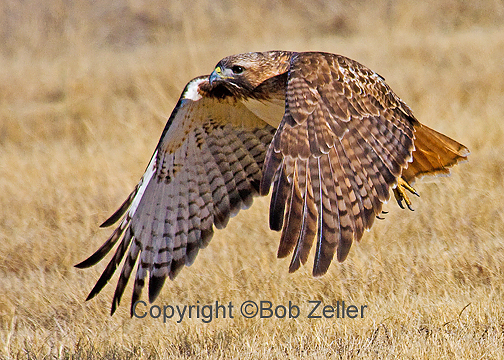
Perhaps the most dramatic of my wildlife encounters occurred on today's ride. There is a red-tailed hawk that I have been seeing near the junction of Hand Cove Road and Highway 412. As I cruised up that stretch of asphalt this morning, I must have startled it as it hunted for some small animal in the roadside weeds. It launched itself in the air with graceful flapping of wings and a few high-pitched shrieks and glided across the road directly in front of me, so close that I could almost have reached out to stroke the soft feathers of its back and tail. I have come almost as close to bald eagles on two different occasions while kayaking. . . . The bike and the kayak are the stealth tools of the accidental naturalist.